
How to Track Customer Dues in a Wholesale Business
Learn how to track customer dues in wholesale: link credit sales to invoices, log partial payments, age balances weekly and collect faster.

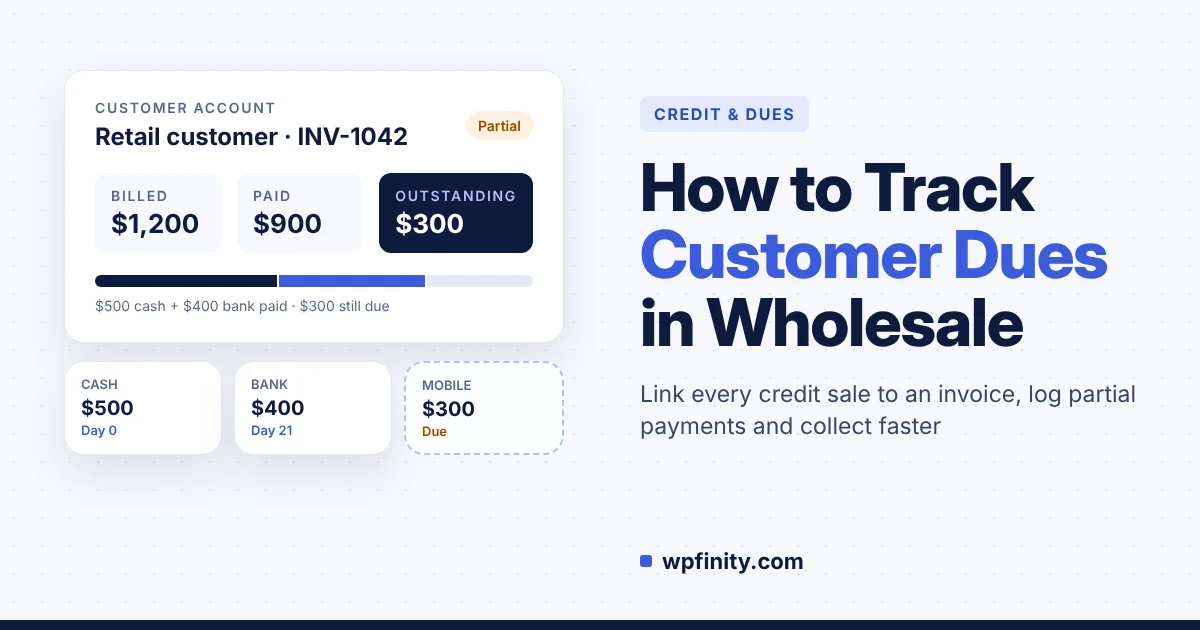
Short answer: To track customer dues, tie every credit sale to an invoice, record every payment (full or partial) against that invoice, and keep one running balance per customer: billed minus paid equals outstanding. Then review those balances by age every week and chase the oldest first. A notebook can do this for ten customers; past that, you need software that does the math for you.
If you sell on credit, your dues are cash you already earned but can’t spend. This guide shows a simple system that works for any wholesale business, with a worked example of a customer paying one invoice in three parts. Want to follow along in a real tool? Install WholeStock free from WordPress.org.
What are customer dues in wholesale?
Customer dues are the unpaid amounts your buyers owe you for goods already delivered on credit. Accountants call this accounts receivable. In wholesale, dues build up fast because shops and resellers often take stock today and pay over weeks, in several installments, by cash, bank transfer, mobile money or check.
Three numbers define every customer’s position:
- Billed: the total of all invoices you have issued to that customer.
- Paid: the total of every payment received, including partial ones.
- Outstanding: billed minus paid. This is the due you need to collect.
Why do customer dues get out of control?
Customer dues get out of control when sales and payments are recorded in different places, so nobody can see one true balance per customer. The order is in a spreadsheet, the payment is in a WhatsApp message, and the check is in a drawer.
This is not a small-business quirk. In its 2026 US payment practices report, Atradius found that US businesses make 45% of B2B sales on credit, late payments affect an average of 22% of B2B receivables, and companies often lose 1% to 2% of B2B invoices as bad debt. 55% of suppliers said customers delay payment, mostly because of cash shortages.
For a distributor on thin margins, that adds up quickly:
- Cash stuck in dues means you can’t pay for the next shipment without borrowing.
- Missed partial payments lead to awkward disputes when you ask for money already paid.
- Old dues turn into bad debt because nobody noticed a balance passing 90 days.
- Month-end reconciliation eats a day of re-adding invoices and receipts by hand.
How do you track customer dues? A 6-step system
The most reliable way to track customer dues is to link every sale, invoice and payment to one customer record, so the outstanding balance updates itself. Here is the system, in order:
- Create one profile per buying account. Use the business name, not the person who picks up the goods, and store phone, email and address.
- Turn every credit sale into a numbered invoice. No invoice, no credit. The invoice number is what both sides refer to when settling up.
- Record every payment against a specific invoice. Note the amount, date and method (cash, bank, mobile or check), even if it covers only part of the bill.
- Keep a running balance per customer. Billed minus paid, updated the moment a payment is logged, not at month-end.
- Age the dues every week. Group each unpaid balance by how old it is: 0–30, 31–60, 61–90 and over 90 days, the buckets the U.S. Chamber of Commerce guide to aging reports uses.
- Act on the ages. Send a reminder at 30 days, call at 60, and pause new credit at 90 until the account is brought current.
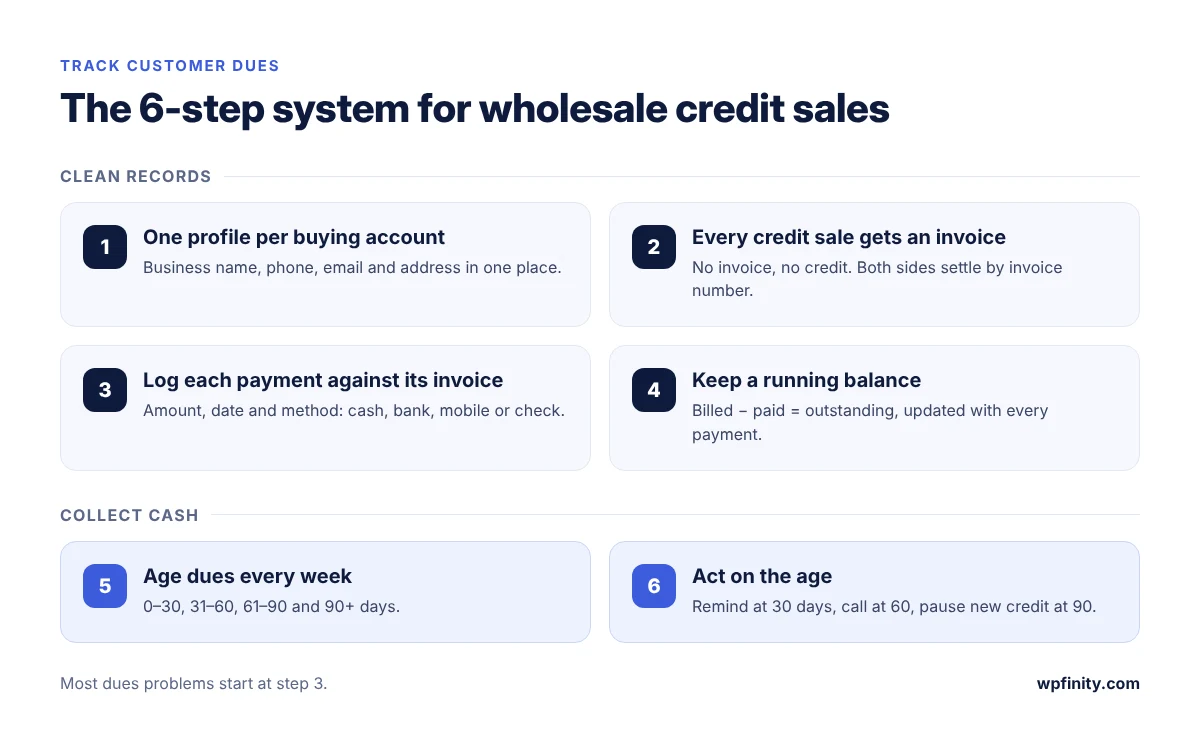
Steps 1 to 4 are about clean records. Steps 5 and 6 are what actually bring the cash in. Most dues problems come from skipping step 3: a payment recorded without its invoice cannot be matched later.
What does a three-part payment look like on paper?
A three-part payment is one invoice settled through several smaller payments, and each one must reduce the same invoice balance. Say a grocery retailer buys 40 cartons of cooking oil (12 bottles per carton) at $30 a carton on invoice INV-1042:
| Day | Event | Method | Paid | Outstanding | Status |
|---|---|---|---|---|---|
| 0 | Goods delivered, INV-1042 issued | — | $0 | $1,200 | Unpaid |
| 0 | Payment on delivery | Cash | $500 | $700 | Partial |
| 21 | Second payment | Bank transfer | $400 | $300 | Partial |
| 45 | Final payment | Mobile | $300 | $0 | Paid |
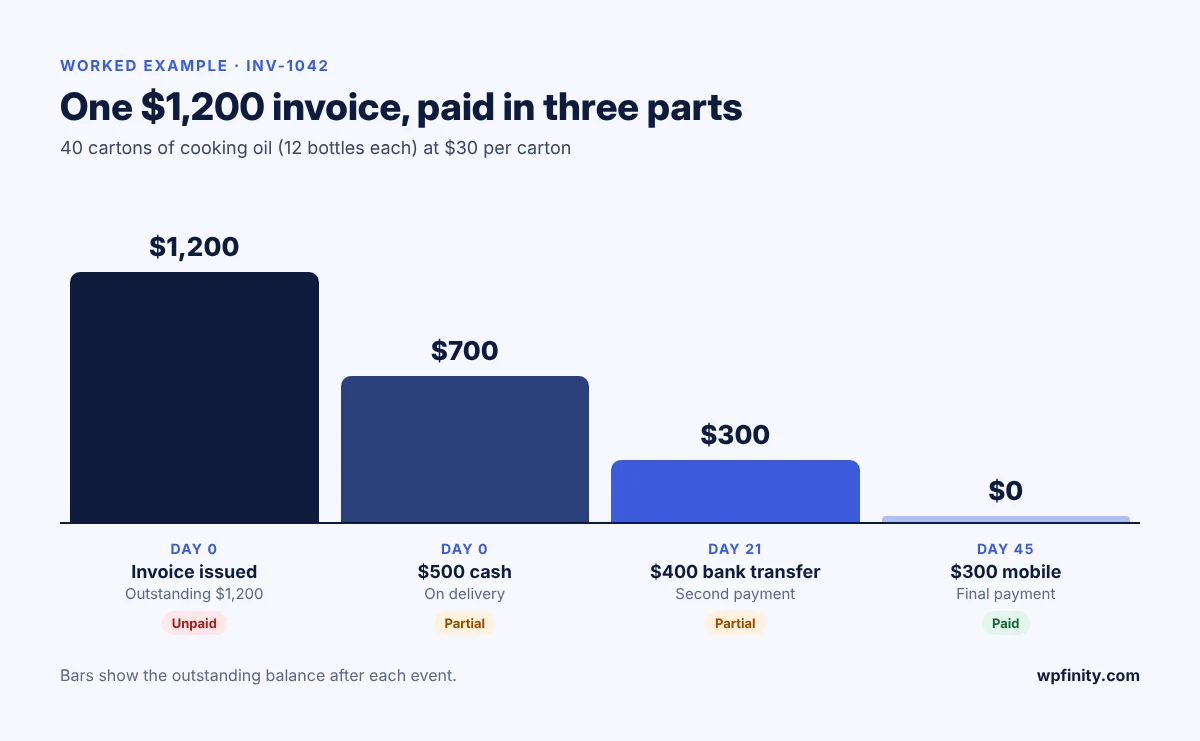
Written in a notebook, this is four lines spread across six weeks, and the day-45 payment often gets logged against the wrong bill. In a system that links payments to invoices, the status changes from unpaid to partial to paid by itself, and the customer’s outstanding total is always right.
Track every due and partial payment for free
WholeStock’s free core gives each customer a live billed, paid and outstanding balance inside your own WordPress site. No WooCommerce, no monthly fee.
Notebook, spreadsheet or inventory software: which tracks dues best?
A notebook works for a handful of customers, a spreadsheet works until several people edit it, and dedicated software works once dues are tied to daily orders and stock.
| What you need | Notebook | Spreadsheet | WholeStock |
|---|---|---|---|
| Balance per customer | Added by hand | Formulas you maintain | Calculated automatically |
| Partial payments per invoice | Easy to miss | Manual matching | Logged against the order |
| Link to stock sold | None | Separate sheet | Same order, same batch |
| Who changed what | Unknown | Hard to trace | Audit log with before/after |
| Staff access | Whoever has the book | Whole file or nothing | Staff can’t see cost or profit |
| Cost | Paper | Free to low | Free core; Pro optional |
If you’re still deciding when to move off spreadsheets, our wholesale inventory management guide covers the stock side of the same system.
How does WholeStock track customer dues in WordPress?
WholeStock tracks customer dues by tying every sales order, invoice and payment to a customer profile, which always shows total billed, total paid and outstanding due. It runs as a standalone WordPress plugin and keeps data in your own WordPress database.
Here is the INV-1042 example inside WholeStock:
- Add the retailer as a customer with company, phone, email and address.
- Create a sales order for 40 cartons from a specific batch. WholeStock checks remaining batch stock, so you can’t oversell.
- Confirm and deliver the order, then share the branded invoice by link, print it or download it as a PDF.
- Log the $500 cash payment. Payment status switches to partial automatically.
- Log the $400 bank transfer and the $300 mobile payment as they arrive. Status turns to paid, and the customer’s outstanding due drops to zero.
A few things owners usually ask before switching:
- Is it really free? The core plugin, including customers, dues, partial payments and invoices, is free on WordPress.org.
- Can staff take payments without seeing margins? Yes. Editor-level staff can manage customers, orders, payments and stock, but can’t see cost or profit.
- What if someone edits a payment? The audit log records every create, update and delete, with the user, time and before/after values.
- Do I need special hosting? No. WholeStock needs WordPress 6.2+ and PHP 8.0+ and runs on standard hosting.
When a customer disputes a balance, WholeStock Pro adds customer ledger statements: orders and payments in date order with a running balance, printable on A4 or thermal paper. Pro also adds order discounts that flow into dues, and CSV exports of customers and orders. Pro is a one-time lifetime or annual license with no per-seat or monthly fees, backed by a 14-day money-back guarantee. See everything WholeStock does, or browse more guides on the Wpfinity blog.
Frequently asked questions
What is the best way to track customer dues?
Link every credit sale to a numbered invoice, record each payment against that invoice, and keep one running balance per customer (billed minus paid). Software such as WholeStock does the balance math automatically.
How do I record a partial payment from a wholesale customer?
Log the amount, date and method against the original invoice, not as a loose receipt. The invoice stays partially paid and the customer’s outstanding balance drops by that amount.
What is an accounts receivable aging report?
It groups unpaid balances by age, usually 0–30, 31–60, 61–90 and over 90 days, so you can see which dues are getting risky and chase the oldest first.
How often should a wholesaler review customer dues?
Weekly. A weekly review catches balances moving past 30 or 60 days while the customer is still buying and easy to reach.
Can I track customer dues in WordPress without WooCommerce?
Yes. WholeStock is a standalone WordPress plugin that tracks customers, orders, partial payments and dues without WooCommerce, in your own WordPress database.
Can my staff record payments without seeing my profit?
Yes. In WholeStock, Editor-level staff can manage customers, orders and payments, while cost and profit figures stay visible only to administrators.
Start collecting dues with clear numbers
Install the free WholeStock plugin, add your credit customers and log your next payment. You’ll see every customer’s outstanding balance in minutes.

 Wholesale & Inventory
November 3, 2026
Self-Hosted Inventory Software vs SaaS for Wholesalers
Self-hosted inventory software vs SaaS for wholesalers: real 3-year costs, data ownership, when SaaS still wins, and how WholeStock works.
Read more
 Wholesale & Inventory
November 1, 2026
Delivery Challan: Format, Uses and How to Make One
What a delivery challan is, what to include, how it differs from an invoice and gate pass, and how wholesalers…
Read more
 Wholesale & Inventory
October 26, 2026
How to Calculate Wholesale Price: Markup vs Margin
Calculate wholesale price the right way: landed cost, margin vs markup, carton pricing, discounts and credit terms, with a worked…
Read more
Get new articles & release notes in your inbox
Sign up for updates on our upcoming releases. No spam — unsubscribe anytime.


One Response